Projects

(Unreleased)
Squadron 42
Squadron 42 is the single player cinematic experience counterpart and sister project to Star Citizen. It contains a mixture of FPS and Space Sim gameplay.
My involvement in the project has been in two stages;
- My first 6 years at CIG, working as a level designer and mission scripter, with some crossover systems design work
- My subsequent time at CIG, supporting the project from the Systems Design team, working with feature teams (primarily programmers and, depending on the feature, animators or UI artists/designers)
CIG’s development progress playthrough (2024)
CIG’s development progress trailer (2023)
Level Design (pre-production & earlier production)
- Level ownership, from block-outs of FPS & space flight environments to working closely with artists in sprint-based iterations
- Scripting mission flow & events with in-house visual scripting tools (a combination of an esoteric visual mission scripting environment, and a CryEngine native level visual scripting tool)
- Prototyping gameplay unique to levels during production, and pre-production prototyping of level & mission types
- Tools; working with technical directors & leads to ensure new mission & AI behaviour scripting tools provided the required functionality & viable workflows
- Mentoring; training and guiding designers in the use of CryEngine, in-house scripting tools and methodology
- Technical setup – vehicles/spaceships (XML, 3DSMAX & in-house tools), interactables, collectables etc.
- Systems documentation and point of contact for single player campaign use cases & requirements
- Working closely with programmers for additional level and project specific features
System Design
- Working with Design & Game Directors to realise their vision for each feature
- Writing & maintaining feature design & setup documentation
- Working with feature teams to realise various system design implementations
- Entity creation, editing and experimentation
- Data & logic setup for relevant features
- Test level authoring and upkeep
- Creating & maintaining balance excel sheets to ensure respective features’ balance is properly calculated, and documented
- Prototyping player character feature flow with existing animations as placeholder proof of concept once code support was provided
- Working with level design and tech design to ensure systems are used appropriately throughout the project
- Prototyping & subsequent production implementation of a specific feature (initial design proposal, scripting, entity setup & level setup)
(Unreleased) FPS Radar
CIG dev. update videos (Note: these videos do not belong to me)
Star Citizen has a released radar system used in its spaceships and vehicles, which I have also worked on.
The work in progress feature discussed in these video clips leverages the same underlying framework to provide “on foot” radar functionality.
My work on this feature included:
- Working extensively with the Design Director and Lead to formulate the design
- Proofing out various aspects of the feature with various excel formula and image mockups
- Writing and maintaining the design document & setup documentation
- Working with the feature’s programmers and UI artists to realise the feature
- Data setup and balance
- Testing and feeding back on the feature
- Creating test levels
(Unreleased) Animated Interactions
CIG dev. update video (Note: this video does not belong to me)
Player Animated Interactions work in progress shown at CitizenCon 2023 had two main facets:
- A means to build player controlled objects with synchronised prop and player character animations, driven by specified inputs, such as turning a valve, or priming a pump handle used as a manual door override, with outputs to control aspects of the environment (such as the door, and the leaking pipes)
- An extension of the existing interaction system for an interaction to trigger animations, and the interaction’s outcome to be timed with the correct part of the animation (e.g. as seen in the second video, doors opening, or lights switching on, when the player animation reaches the point of pushing the associated button in the environment)
- Working with the Design Director and Lead to formulate the design
- Writing and maintaining the design document & setup documentation
- Working with the feature’s programmer and animators to realise the feature, testing the provided tools and giving feedback
- Implementing the presentation demo seen in the video
(PC Alpha releases)
Star Citizen
Star Citizen is a feature rich FPS & Space Sim MMO, and can be described as an “everything game” in terms of its ambition and scope. Star Citizen’s development model is crowd funded, with the game deploying regular Alpha releases of new content and features for the past decade.
During my initial year at the company, I created the level blockouts for two of the earlier space ships (flying vehicles with interior levels of their own).
However, my work on the project was primarily as an embedded systems designer, supporting various feature development teams (comprised of programmers and animators, with downstream support from other disciplines), including:
CIG’s engine & SC trailer (2024)
- Working with Design & Game Directors to realise their vision for each feature, from feature conception, through to release
- Writing & maintaining System Design & setup documentation, and being the point of contact for each owned feature
- Using Excel to create feature proof of concepts, balance tables, and data for QA to test against
- Ensuring moment-to-moment gameplay feels as intended & broader feature aspects have intended vertical & horizontal progression
- Technical setup –
- Supporting feature development with entity setup and test levels
- Providing feature design & setup knowledge to tech & level design teams
- Live releases
- Working with production and the feature team to ensuring features meet deadlines, and release as an MVP
- Collating and analysing player feedback for director review to assess immediate changes, fixes & plan for future development
- Mentoring – guiding less experienced designers in various stages of their feature work
- Occasionally appearing on developer progress/diary pre-recorded YouTube shows and live streams to give progress updates on WIP features.
Injuries, Healing, Medication & Player Death
CIG dev. update video (Note: this video does not belong to me)
Injuries & Medications greatly expanded the “Actor Status” character system, which governs a player’s possible gameplay states and associated effects. The release contained numerous new game systems, locations and relevant content, and is one of the larger combined feature & content releases to the game to date.
Read more feature details
- A per body part injury system (head, torso, each arm, each leg) which accrues and tracks body part damage, irrespective of the health pool being healed
- Gameplay, visual and audio effects specific and unique to head, torso, arm and leg injuries
- Multiple injury severities, which each added or increased the severity of injury gameplay, visual and audio effects
- A shared “hurt” locomotion animation set, used when any body part reaches its most severe injury
- Injuries of a particular severity could only be permanently removed by using a medical bed of equal or higher tier
- Medication that temporarily masks or reduces said injury effects, but adds the complication of increased blood drug level
- high levels of blood drug level can lead to gameplay hindrances, and in its extreme, character death
- higher tier devices reduce the amount of blood drug level added by medication
- pre-existing healing pens were updated to also increase the blood drug level, so that there is consequence to spam-healing
- New environments & locations for healing & player respawn points (hospitals, clinics), which were placed across the game
- Spaceship hangars had emergency medical elevators added to them, allowing players to place another player inside and send them direct to the location’s hospital
- A new “downed” incapacitated player character state which precedes character death,
- with a decaying-over-time “downed” pool which results in character death upon reaching zero.
- additional damage to the character reduces the “downed” pool
- with a decaying-over-time “downed” pool which results in character death upon reaching zero.
- Character death leaving behind a corpse and all their equipped items, lootable by anyone (previously the body would vanish)
- New rules for how and where a player respawns upon character death
- Players could specify a location as their respawn point by visiting it and using an in-game screen interface, at either a hospital, or a spaceship containing high enough tier medical bed
- Respawn queue and UI to inform the player of their position, for locations and ships with limited respawn capacity (with the option to use an alternative respawn location)
- Entering a downed state in a Landing Zone (a safe, more regulated environment for players) would, after an initial timer, result in their respawning in hospital without dying or losing their items (under the guise of their being “rescued” by the local NPC authorities)
- New gameplay entities related to healing & respawning
- Medical beds, which the player character interacted with to lay down on in order to use, providing
- an in-world screen interface (whilst on the bed) to select injury repair, or symptom masking drugs if the tier of bed was not high enough to remove the injury
- a respawn point for players who have set the bed’s location as their chosen respawn location; respawned players would spawn laying down in the bed, wearing a medical gown
- The existing “multi-tool” pistol had a healing medical beam attachment added (the beam would restore the target’s health over time, whilst also adding to their blood drug level)
- A new “Medgun” tool pistol was added, allowing the healing and various symptom masking drugs to be administered to a target, or its wielder
- The default mode of the just healed (and added blood drug level to) the target
- An “advanced” mode could be toggled to, allowing the player to customise the beam’s dosage of each drug type using sliders displayed on a screen on the back of the device
- New “gurneys” (a player pushable trolly combined with bed functionality, for another character to use and be pushed around whilst laying down and attached to the gurney)
- Medical beds, which the player character interacted with to lay down on in order to use, providing
- Abilities to help or heal other characters
- The ability to inject another player with any pen type
- Extended body dragging to allow a player to drag and lift another character into a medical bed or gurney
- The ability for one player to revive an incapacitated player with a medical pen (synchronised character animation of the injector and prone recipient characters)
- New player generated “Player revive beacon” missions, which other players can accept and receive in-game payment for completing
CIG dev. update video (Note: this video does not belong to me)
- Working with the Design Director and Lead to formulate the designs and requirements of each aspect of the feature
- Mid-development updates and “go-no go” pre-launch presentation to demonstrate the feature’s readiness to release
- Design point of contact to answer the team’s questions on the feature’s implementation and intentions
- Writing and maintaining the feature design document & setup documentation for
- Injuries
- Drugs & blood drug level
- Medical beds
- MedGun functionality & required UI
- New respawn flow
- Hospital check-in & “emergency elevator” flow
- Data setup and balance for
- Injury thresholds, ranges and severities of injury effects,
- Blood Drug Level costs for each drug type, affected by its delivery device
- Drunk state thresholds and severities of gameplay & visual effects
- Overdose state’s effects, amount of damage, leading to a threshold resulting in character death vs. eventually recovering automatically
- Dose to drug duration ratios, determining how long symptoms can be masked vs. how much blood drug level is increased, per drug type and per delivery device
- Dose to HP increase ratio, determining how many times a player can heal without negative impacts of blood drug level
- Downed state “downed pool” and decay rate, resulting in time until death, and how many additional shots/damage to kill a downed player.
- Entity creation and setup for
- Medical beds, working with
- the props team to establish metrics and a template entity & mesh
- the feature programmer and UI programmer to ensure the required functionality was provided on the medical bed’s user screen, and observer’s screen
- prop and character animators to ensure the required enter, idle-using, and exit flow was supported
- environment teams to ensure the correct beds were placed in correct locations and ship interiors, with the required setup
- Hospital/Clinic screens for medical room requests, and respawn location management
- Medical injection pens, with the correct props and drug type/effects
- Medical beds, working with
- Liaising with other feature teams to provide required
- new “revival” mission type for players to rescue other players
- new respawn flow UI requirements
- new “weapon” functionality & UI for medical gun device
Inventory
(Note: this video does not belong to me)
The inventory feature in Star Citizen provides players a means to store items on their person (with character attire such as armour, clothing and backpacks providing capacity), in physicalised storage containers, and in location based storage.
At the time of its initial release, it was introduced as the only interface to provide access to all of these storage mediums, and replaced an abstract item storage that was not restricted by location or capacity.
Read more feature details
- A bespoke inventory mode that switched to an “in world” camera view, which framed the player character and their worn attire, but allowed free orbital camera movement and zoom in/out
- A cursor was displayed, with “on hover” causing equipped items on the character to be outlined and display popup information
- click & drag between inventory containers and to/from attach points on the character was supported.
- A contextual menu could be opened for an item via mouse right-click, providing different options, such as “Drop”, “Equip” etc.
- A UI element was displayed for each inventory container, showing all of their contained items
- The current vs. max capacity was displayed as a bar, in numbers and as a %
- this would display a preview update when items from another container were dragged over the container, or from within the container were dragged out, before committing to the move
- A scroll bar displayed when the items didn’t fit within the container’s screen space, and a page system displayed when there was more than x amount of items within the container
- The current vs. max capacity was displayed as a bar, in numbers and as a %
- Inventory containers associated with the character’s attire were displayed on the left of the screen, whilst inventory containers associated with a physical object in world (an inventory container box, a ship’s inventory, or a location’s inventory) were displayed on the right of the screen
- Nested inventory was supported (e.g. A ship inventory could contain a backpack, which could contain trousers with their own inventory)
- Items with their own inventory displayed a button, allowing their inventory to be opened in a new container or tab within the UI
- A cursor was displayed, with “on hover” causing equipped items on the character to be outlined and display popup information
- An inventory’s storage capacity was assessed by two methods, both of which had to be passed in order for an item to be allowed to be stored within it
- Its remaining volume, presented in a Star Citizen unit of microSCU (SCU, or Standard Cargo Units, being used for cargo containers transported by spaceships)
- Its maximum extent in X, Y, Z – the intent being to prevent a storage container like a small backpack fitting a pool cue or long sniper rifle, with the direction being given to keep thinks as seemingly physically based as possible
CIG dev. update video (Note: this video does not belong to me)
- Working with the Design Director and Lead to formulate the designs and requirements of each aspect of the feature
- Updating an existing design document and expanding it to match the design direction and specification
- Supporting the feature team (programmer, UI artist & character animator) to realise the feature’s on-time release, providing setup support, test levels and setup documentation
- Creating a spreadsheet to more easily track and balance occupancy values for the various item types
- Entity setup updates to dozens of templates, and hundreds of objects with bespoke occupancy values
- Data setup for the different display & sort filters, and matching entity types
- Working with (delegating tasks and providing feedback to) a Junior Tech Designer to ensure the feature development had the design implementation and feedback support it needed, delegating stat gathering and zoo level creation
Tractor Beam
Playthrough video (Note: this video does not belong to me)
The Tractor Beam was one of the first features I worked on upon joining the System Design team; the brief was to create a systemic, physics based tractor beam, for use in FPS and Spaceship gameplay, and function differently in different states of gravity.
To begin this work, I created an excel sheet, using formula and the parameters my design specified to describe distances, speeds and acceleration ranges possible for different target mass and gravity acceleration (corresponding to typical gravity values in Star Citizen’s different environments, including Earth-like, moon, and Zero-G).
After providing the initial signed off design documentation and excel sheet formula, another designer took over the feature whilst I moved on to other work.
Planetary Temperature

(Note: this image was not created by me)
Temperature in Star Citizen can adversely affect player characters through gameplay effects and causing damage over time, which can lead to character death.
The temperature for any particular location on one of the game’s planets is calculated based on time of day, altitude, humidity, atmospheric density and wind speed, all of which use complex algorithms which mimic real life methods of calculating temperature; designer set values feed into this system, with wind speeds fluctuating based on its own system.
Whilst the design work for this feature was done by another, my work on the feature included:
- Assisting in later work for balancing and categorising player character attire that protects the player from effects of harsher temperatures
- Setting up a new star system’s planet and moon temperatures and wind speed values, and creating the means to more accurately do so*
*Due to the complex nature of the feature, I used Excel and its Visual Basic scripting interface to create a calculating sheet for designers to use as a tool to calculate the effects of the parameters they enter, and also provide QA expected temperature ranges per planet, per time of day, altitude etc. to test against with spot checks.
Force Reactions
CIG dev. update video (Note: these videos does not belong to me)
Force Reactions causes game characters to react to different types and severities of forces acted upon them, with a corresponding reaction type and severity, in a direction relative to the received force.
Said reactions range from brief player camera movement, to a stagger animation (momentarily removing player control), to a knocked-down animation (removing player control for longer, and changing stance to prone).
The brief was to make the feature as systemically driven by the engine’s physics system as possible.
My work on this feature involved:
- Working with the Design Director and Lead to formulate the design
- Writing and maintaining the design document for the feature, as well as setup documentation
- Creating an excel balancing sheet to visualise the full range of force reaction types achieved with each weapon (the mass and velocity of each ammo varying) across the range of possible distances, per armour type worn by the target (with different armours providing different force mitigation)
- Working with the assigned programmer, animator and junior tech designer to realise the feature’s implementation and timely release, through iterations and feedback on functionality and gameplay feel
Interactions
CIG dev. update video (Note: this video does not belong to me)
The interaction system in Star Citizen allows multiple interactions to be available on a single interactable, with the player able to choose and trigger their desired interaction.
An interaction state system ensures only the relevant interactions are available for the current state.
e.g. a door can be opened, closed, locked and unlocked.
e.g. player carriable items provide the interactions to be carried, inspected, holstered to the suit, stored in inventory, placed, thrown, or dropped (and weapons add “carry lowered”, primarily for role play purposes).
An older system existed that the player base had become used to over several years.
Read more on the previous (replaced) version of the feature
- Primarily an interaction mode: whilst in this mode, a cursor was displayed, and used to select interactions (text) shown in a flat vertical list for the current interaction target (the object nearest the cursor in screen space),
- Interaction selection could be finicky and inaccurate
- The interaction input had to be held to remain in the mode, and the left mouse button triggered the interaction under the cursor
- Cursor movement also moved the camera, at a different speed based on cursor distance to screen edge
- Player movement at the same time as interaction mode use exacerbated this
- Interactables were identified by a post-process outline whilst in the mode, with the current target’s outline being a more opaque and brighter colour
- Interaction selection could be finicky and inaccurate
- A quick interaction input, but with no visual indication as to which item the player would interact with, or what the interaction triggered would be
In a bid to streamline the interaction experience, and not rely on different modes of play, an updated version of the feature was released.
Read more on the feature update I worked on
- An onscreen interaction prompt that appears adjacent to an interactable entity when it is the current interaction target, regardless of what mode the player is in, allowing for quick, accurate and informed interacting
- An icon attached to the prompt, displayed when multiple interactions are available (other than the one prompted)
- The old system’s flat list of text was removed, and the prompt displayed (showing a left mouse button whilst in interaction mode) instead of the interaction input
- An interaction selection wheel menu, opened by holding (instead of pressing) the prompted input.
- Making it easier and faster to choose from the available interactions (whereas before cursor movement may overshoot or misjudge which interaction would be clicked on, the wheel menu ensures an obvious and guaranteed selection)
- This built on the work done from the Quick-Select menu feature I worked on previously
- A new system of defining default interactions (displayed on the prompt, or available whilst carried via left mouse and right mouse buttons), allowing data to define categories of items, and what their defaults should be
- A means for players to customise the default interaction, per category, per state, was provided via the interaction wheel menu
- This feature was tied into the Control Hints (a feature I had previously worked on), so it could accurately display what the primary and secondary inputs would trigger for the current held item
- Working with the Design Director and Lead to formulate the design
- Competitor analysis, to provide an informed discussion about what feels good about existing, well received solutions, and their pros/cons
- Writing and maintaining the design document & setup documentation
- Working with the feature’s programmer and UI artist to iterate on the implementation’s functionality, look & feel, until release
- Supporting with test levels and data setup
- Testing and requesting tool improvements in terms of how parameters and data were exposed and displayed
- Data setup & priority order/logic for
- interactable categories and their default interactions, per state relevant to that entity type
- Control Hint setup to make use of the new dynamic method of prompting input for the currently held item
- Entity setup, across dozens of templates (thousands of entity classes)
Control Hints
(Note: this image was not created by me)
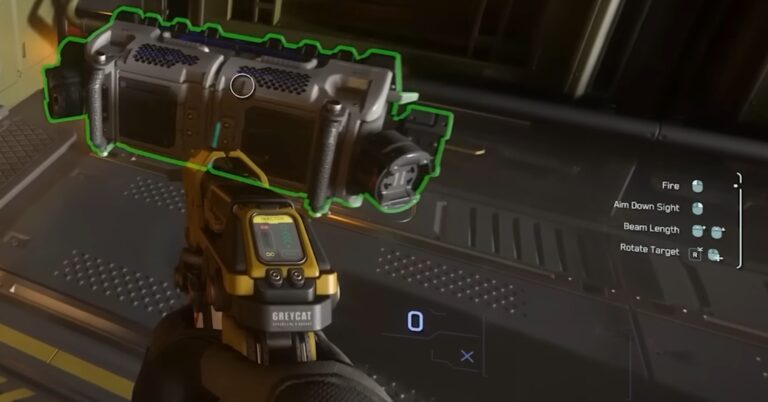
The Control Hints system provides concise input prompts which are contextual to the player’s current states (on foot or flying a ship, crouched or standing, with weapon or without, holding a healing device etc.), using a mixture of conditions, list order priority and “always display” overrides to determine what to display.
Star Citizen has numerous features with different inputs, or different outcomes from the same input, and with new features being released or iterated on frequently, this feature was deemed useful for new and experienced players alike.
The feature aims to display three inputs at any one time, but can display less in low complexity states, or more in higher complexity locked in game modes, or menus.
My work on the feature involved:
- Working with the Design Director to formulate the design
- Creating a spreadsheet detailing the expected control hint that should display based on conditions met, and list order priority, to proof out the feature and its logic
- Writing and maintaining the design document & setup documentation
- Working with the feature’s programmer and UI artist to iterate on the feature’s development
- Testing and feeding back on the tools provided to ensure they could implement what the design required, and scale to meet the project’s growing needs
- Working with feature teams to ensure their features provided the logic conditions needed to display control hints relevant to their feature’s play experience, at the appropriate time and state
- Data setup to trigger the display of all the input prompts, by making use of various different logical operators and provided game conditions, in specified priority list order
Cargo Loading Mech
Playthrough video (Note: this video does not belong to me)
The ATLS was the first of a new type of vehicle (a bipedal mech) introduced to Star Citizen, with the primary role of moving physical cargo from a ship’s interior to a cargo freight elevator, using a new version of the tractor beam feature.
Prior to this release, all tractor beams maintained the original distance between the player and their target (with player input required to shorten or lengthen the distance).
The new tractor beam provided with the ATLS automatically moved the target object to a position adjacent to the player, and maintained that relative position when moving or turning. A holographic mesh of the target was then displayed as a destination preview wherever the player camera pointed; a subsequent player input would then move the target to the preview location.
A secondary throw input, which charged throw force over time, was also added.
My work on this feature included:
- Working with the Game Director and Design Lead to formulate the design
- Providing frequent updates on the status of the feature, which went through rapid iteration, to my lead and the Game Director
- Writing and maintaining the design document & setup documentation
- Working closely with the feature’s game programmer and animator, through a relatively fast paced iteration cycle of new functionality and game feel
- Balance tweaks to cargo masses and the capabilities of the new tractor beam, as well as existing tractor beams to ensure they all performed the role they were designed for
- Ensuring the ATLS mech was able to move large high mass cargo boxes with its tractor beam
- Improvement passes on existing character-scale tractor beam devices, e.g. to ensure the smallest device felt very responsive in how it moved targets at closer distances, for use in puzzle solving and moving smaller items quickly
- Creating & maintaining test levels for the feature work to progress and be tested in
Action & Item Quick Select Menus
(Note: these videos do not belong to me)
The Player Inner Thought (Action Selection) menu, and item Quick Select menus were amongst the first features I worked on when joining the System Design team, and the first I saw through to initial release.
The Actions selection menu provided:
- A means of discovering and triggering available actions (based on the player’s current state) and emote character animation triggers, via the UI
- Displaying the current input bindings for said actions
- Rebinding input for those actions
- Favouriting actions for easy access when opening the hierarchical menu
- Displaying the current input bindings for said actions
The Quick Select menu provided:
- A means of quickly displaying available options, and choosing to equip one of numerous items attached to their player character
- Separate selection menus were initially added for weapons, grenades, and injectable pens
- Later uses of the feature included the interaction system update
My work on the feature included:
- Working with the Design Director and Lead to formulate the design
- Competitor analysis, to provide an informed discussion about what feels good about existing, well received solutions, and their pros/cons
- Updating and maintaining the existing design document & creating setup documentation
- Working with the feature’s programmer and UI artist to iterate on the implementation’s functionality, look & feel, until release
- Supporting with test levels and data setup
EVA & Zero-G Surface Traversal
CIG dev. update video (Note: this video does not belong to me)
The EVA feature allows player characters to traverse through Zero-G environments with full pitch, roll and yaw movement control, as well as controlled movement in (local) X,Y,Z directions.
The previous iteration of this feature had difficulties traversing in some of the game’s smaller environments, and didn’t provide any indication as to the player character’s footprint, or give a sense of direction in larger spaces.
Read more feature details
- A reduced character footprint, to improve traversal in smaller environments, by maintaining the player character’s prone forward direction (similar to the Superman or Ironman flight pose)
- Star Citizen’s “unified rig” approach typically requires 1st and 3rd person animation assets to be the same (in a bid to make everyone’s experience in the game 1:1 with each other)
- small first person camera movements from the forward direction triggered the character’s head and neck to animate with the camera movement
- camera movement further from character’s the forward direction caused the body to rotate around and about the forward travel direction, resulting in the player camera turning and looking back along the character’s body, seeing the torso and legs
- this provided a visual frame of reference vs. the environment and the player character’s forward direction
- the body’s forward direction only changed when
- player input pitched upwards beyond a threshold that the neck can’t physically go beyond and look natural
- the forward thrust input was used whilst the player camera pointed in a direction that differs from the forward direction
- small incremental changes required no additional animation play (e.g. if the player continues to hold the forward input, whilst changing camera direction)
- a full body animation was played to reorientate the player character’s forward direction if the difference between the camera’s direction and the current forward direction was large enough
- Star Citizen’s “unified rig” approach typically requires 1st and 3rd person animation assets to be the same (in a bid to make everyone’s experience in the game 1:1 with each other)
- An approximation of Newtonian motion was implemented, in that thrusting in a direction maintained a velocity until another thrust input was received from the player
- the feature enforced a maximum speed, meaning that true Newtonian motion and constant acceleration was not possible, but the sense of thrusting in a direction and continuing to travel at that velocity until a new thrust input and change in direction, gave a similar easier to control experience.
- forward movement input automatically applied enough thrust in other directions to achieve the new forward direction (i.e. the player did not have to manually counteract their previous velocity with precise thrust amount and direction
- Working with the Design Director and Lead to formulate the design
- Writing and maintaining the design document & setup documentation
- Working with the feature’s programmer and animator to iterate on the implementation’s look and feel
- Created and maintained a test level to move around a variety of blockout geometry configurations, examples of existing ship & space station interiors and exteriors
- Data setup and balance, for thrust speeds, accelerations, and varied speed limits in smaller environment size categories
Ladders
Playthrough video (Note: this video does not belong to me)
Ladders in Star Citizen previously restricted the player’s first person camera to a fixed viewing direction, framing the ladder section directly in front of the character whilst attached to the ladder. Up, down, and a faster slide-downwards movement were supported whilst attached.
The only way to exit the ladder was at the top or bottom enter/exit points (or character death).
Read more feature details
The updated feature introduced
- Free first person camera movement, driving character animation to turn the head, and beyond certain thresholds the body (with its “unified rig” approach, 1st & 3rd person animations are the typically the same asset in Star Citizen, making this more complicated to implement)
- Upon attaching to the ladder, the first person camera blends into an initial “look up” framed camera view, promoting a traversal experience by default
- Mid-point enter/exits, to support the ladder spanning multiple floors, or be placed adjacent to platforms, shipping containers etc. and allow appropriate enter/exits
- Exit the ladder from any point, via
- Jumping in the direction of the first person camera (which could then land on another ladder or vault/mantle markup to climb up onto a higher surface)
- Detaching and falling
- Leaning from the ladder, clearing the path of the ladder, or dodge incoming weapons fire etc.
- Greatly improved enter checks, resulting in a player needing to walk into/at the ladder with the obvious intention of attaching to it (removing a bugbear of many for the previous implementation)
My work on the feature included:
- Working with the Design Director and Lead to formulate the design
- Establishing existing use cases and limitations of the current system in the existing environments
- Competitor analysis, to provide an informed discussion about what feels good about existing, well received solutions, and their pros/cons
- Writing and maintaining the design document & setup documentation
- Working with the feature’s programmer and animator to iterate on the implementation’s functionality & feel, until release
- Ladder entity data setup
- Testing ladder entity setup and providing feedback on its functionality and user-friendliness
- Created a test level with a variety of blockout layouts using ladders, and containing use cases from existing spaceship vehicle interiors for comparison and testing
Grenades & Generic Throwables
CIG dev. update video (Note: this video does not belong to me)
The previous Grenade implementation (which had a single input to equip and throw a grenade in one action) was replaced with a new throwing system.
In addition to grenades, the same throwing system was added to all of the generic carryables in the game, allowing everything carryable to be thrown in a similar manner.
Read more feature details
The updated feature introduced:
- Grenades were changed to be equipped and held in a pose that kept them visible to the first person camera, rather than immediately thrown
- Whilst held, they could also be holstered to an attachment slot on the worn armour
- The “fire” input was mapped to
- On press: prime & throw the grenade
- On hold: prime the grenade and change pose to a raised arm, ready to throw, whilst displaying a preview throwing arc via the UI
- The grenade was thrown when the input was released, or it exploded in the player character’s hand if “cooked” too long
- An underarm throw was also introduced, allowing for more subtle, closer thrown grenade placement.
- A new UI throw arc was added, to afford better aiming whilst preparing to throw the held object
- The speed and distance of the throw was changed to be driven by a specified throw force, rather than set velocity, meaning the behaviour differed in different gravity environments (with less of an arc and greater throw distance on the game’s lower gravity moons, and a straight line when in zero-gravity)
- Working with the Design Director and Lead to update the design and ensure their expectations were met during development
- Updating an existing design doc and maintaining the design document & setup documentation
- Working with the feature’s programmer and animator to iterate on the implementation’s functionality, look & feel, until release
- Supporting with entity and associated data setup
Mounted Gun
CIG dev. update video (Note: this video does not belong to me)
The mounted gun feature introduced a new FPS combat element of small vehicle scale weapons attached to a rotatable mount. The initial release was with a mini-gun style weapon.
Read more feature details
The feature animated the character and mount together as the means to adjust aim in response to player input, causing the character to side step about & around the mount when the movement was large enough.
This created a fluid first person experience, whilst maintaining Star Citizen’s unified rig approach (shared first and third person animations).
The weapon movement had some slight intentional lag applied vs. the player’s input, to give the controls and mounted weapon movement a sense of weight, and additional need to anticipate movement.
Whilst in the normal first person camera aiming was achieved via the attached weapon’s tracer rounds and roughly lining up the weapon’s barrel.
However, Aim Down Sight was supported by the feature, with a targeting reticle displaying on the screen attached to the mount, and a slower movement speed applied for more precision aiming, but a reduced ability to switch to a different target.
My work on the feature included:
- Working with the Design Director and Lead to formulate the design
- Writing and maintaining the design document & setup documentation
- Working with the feature’s programmer and animator to iterate on the implementation’s functionality, look & feel, until release
- Supporting with entity and associated data setup
- Balancing the feel of the movement lag and speed of aiming/rotation
Body Dragging
CIG dev. update video (Note: this video does not belong to me)
Body Dragging allows a player to grip and drag another dead or incapacitated character; the player character performing the dragging is limited in their speed and available actions.
Read more feature details
The dragged character remains in a ragdoll state, with a point on their left shoulder attached to the dragging player character’s outstretched left hand. As the player character traverses whilst in a left-hand outstretched pose, the dragged character is moved via the physics system.
This results in the dragged ragdoll conforming to the terrain they are moved over, and the body maintaining an expected relative position and orientation to the dragging player character, whether on the flat, or up or down slope from one another.
Whilst this introduced a number of implementation problems to overcome, the brief was to take this approach rather than rely on a variety of prone idle animations that would not always properly conform to the terrain.
The dragging player character can equip and use a pistol whilst dragging, but otherwise has to drop the dragged character to perform other actions.
The weight of the dragged character affects the speed of the dragging character, as do terrain slope angles and surface friction types (which act upon the dragged ragdoll).
The feature was later extended to support placing a dragged character into a medical bed (to allow players to rescue and heal one another via that in-game tool).
- Working with the Design Director and Lead to update the design and ensure their expectations were met during development
- Updating an existing design doc and maintaining the design document & setup documentation
- Working with the feature’s programmer and animator to iterate on the implementation’s functionality, look & feel, until release
- Supporting with associated data setup, achieving the desired gameplay feel through speed ranges, adjusting the effect of weight, and experimenting dragging on different terrain surface types.
- Working with (delegating tasks and providing feedback to) a Junior Tech Designer to assist with the feature
Trollies
CIG dev. update video (Note: this video does not belong to me)
Trollies were introduced into Star Citizen as a means of moving numerous cargo boxes at once, and as a tool for level or mission design to use in puzzles.
The player can interact with a grip, causing them to enter a gripping pose, and attach to the trolley, with subsequent movement applying a force on the trolley to push or drag it.
Read more feature details
The trolley wheels and subsequent movement & gameplay feel was intentionally implemented to mimic real life trolley and shopping cart behaviour.
The game’s physics system was leveraged to achieve this, taking the trolley’s weight, the force the character is able to provide in different forms of directional acceleration, and wheel positioning on the trolley to have an effect on control responsiveness.
Slope angles and surface friction types also affect the possible movement speeds, with some heavier trollies unable to be pushed up slopes that lighter trollies can be pushed up.
Character animation blend spaces were driven by the force needed to move the pushed object, causing the player character to lean more (forwards when pushing, backwards when pulling), as more force was needed and applied to move the trolley
The feature was later extended
- To be used for medical gurneys, allowing players to place another player or NPC into said gurney, and move push or pull them around the environment
- To implement sci-fi hover trollies, using the same grip holding setup and character animation blend spaces driven by the force needed to move the pushed object to achieve the same effect.
- Working with the Design Director and Lead to formulate the design
- Writing and maintaining the design document & setup documentation
- Working with the feature’s programmer and animator to iterate on the implementation’s functionality, look & feel, until release
- Supporting with entity and associated data setup for trolley mass, and player input to force and resulting acceleration parameters
- Creating an initial test level for the feature
- Working with (delegating tasks and providing feedback to) a Junior Tech Designer to assist with the feature with expanding the test level
(WiiU Exclusive – Mar. 2013)
Lego City Undercover
Lego City Undercover is an open world Lego game, set within the Lego City toyline’s titular city. The gameplay is a mixture of 3rd person traversal, driving, simple melee combat, simple puzzles, and fixed camera sections (primarily for more involved platformer traversal sections, and most of the smaller standalone levels).
The game’s open world missions are punctuated with standalone levels, which can be revisited to access side content by using character abilities and unlocks which would not have been available when played as part of the critical path.
Critical Path Missions
As the first dedicated mission scripter on the project, I built the initial framework for most of the critical path open world missions in the game, handing some of them to other designers as they came onto the project, but working on others until release.
This involved:
- Objectives, hints, tutorials, map icon activation, mission start points, checkpoint saves, and video calls from mission givers
- NPC spawning, setup & scripting, including choreographing driving chase sequences, and melee combat sequences
- Interactable Props placement & entity setup needed for mission flow
- In-game camera pans and associated scripted events, including character pathing, environment and prop animations
- Using a custom tool to manage a hierarchy of mission scripts, with scripts “unlocked” and “finished” based on the tool’s progression variables
Scripts were a custom (loosely & simplified) C based language. Each script comprised of one or more states, with each state having both a conditions section and a flow section.
Conditions would run every tick, and were primarily used to change state, whilst the flow section was capable of running native function calls which took time before progressing the logic flow (e.g. playing animations, NPC pathing requests), while loops etc.
Scripting Support
Outside of the open world critical path missions, I also worked on:
- Side mission script templates used by other designers to populate the open world city (bonus missions & side content)
- Pre-production prototyping bonus missions and early versions of critical path / story missions
- Standalone Level scripting support, including scripted events, cutscenes, simple puzzles & combat sequences
- Setup & placement of more complex entities which needed scripting support
- e.g. train system (trains traveling around the map on tracks) and player fast travel via train stations, which also teleported trains
- open world state changes & progression unlocks which required script support & script unlock states to achieve
- Scripting & mission tools – working closely with programmers on language & tools development, providing example scripts, test cases, testing and feedback
Leadership
Whilst I am credited as the projects Lead Technical Designer, it would be more accurate to say I worked as the senior or principal mission scripter,
- Mentoring – training & guidance for designers and programmers with bespoke tools, scripting language and mission templates.
- Sanity checking and reviewing others’ work
- Onboarding and assisting new mission scripters
Critical Path - Open World Missions
Playthrough video (Note: this video does not belong to me)
The video (above) shows the game’s first critical path open world mission, one of fifteen chapters that I initially or fully implemented.
The mission contains a mixture of scripted NPCs, tutorials, open world tile-level setup, placed gameplay elements for progression via the scan mechanic, footprint detection mechanic, various camera pans, and an introduction to the game’s combat system.
Level layout and most of the interactable prop setups (those not required for level progression) viewed here were other designers’ work.
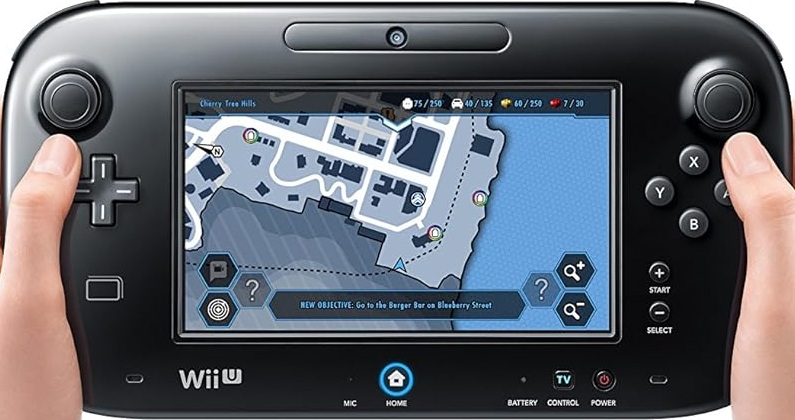
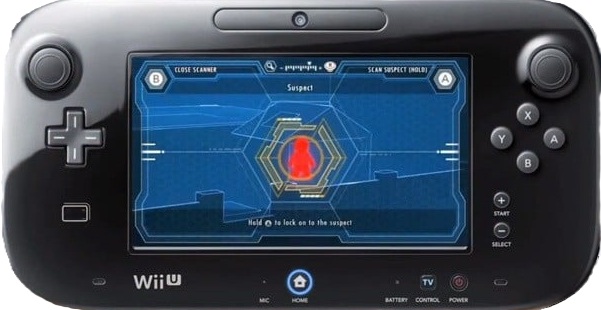
(Note: the scanning mechanic, and video calls are displayed on the WiiU controller’s screen, and thus only visible “on screen” in videos of the later PC, PS4, Switch & Xbox ports, which I did not work on).

Side Content - Open World Missions
Playthrough videos (Note: these videos do not belong to me)
The first 7 videos above & below each show an example of a side mission type, whose template mission scripts I wrote for other designers to use in their implementation of other instances around the open world city.
The final video shows examples of the scripted fast travel systems for ferries and trains, whose script manager I wrote, and train splines I laid across the open world map.
Playthrough videos (Note: these videos do not belong to me)
Standalone Level Support
Playthrough video (Note: this video does not belong to me)
- NPC behaviour for vignettes, combat encounters, and in-game cutscene behaviour
- Mission progression
- Puzzle elements which required script support
(PS4, Xbox One, PC – Feb. 2014)
The Lego Movie Videogame
The Lego Movie Videogame was a tie-in to the film The Lego Movie and followed a more traditional Lego game structure of linear standalone levels, with a hub-level used to access and replay levels. The gameplay involves simple 3rd person traversal, puzzles, mini-games, and combat.
I lead a small level scripting team, providing support to each level for scripted events, simple AI behaviour and more complex puzzle setups (particularly those requiring scripted logic).
Scripted Events
Playthrough video (Note: this video does not belong to me)
The video (above) shows a level section which relied on level script to function. I worked on the prototyping and establishing the implementation approach, implementing the core flow, before handing off the level to another member of the scripting team.
Minigames
Playthrough video (Note: this video does not belong to me)
The video (above) shows one of the game’s minigames and associated simple scripted non-combat NPC behaviours.
(Xbox 360 – Sept. 2010)
Hydrophobia
Hydrophobia is a 3rd person shooter with initially non-lethal weaponry (relying on player triggerable environmental hazards as a means to kill enemies), simple puzzle elements, and (at the time) a unique water simulation engine.
Originally intended as a much larger and deeper project, restrictions of the water simulation, various development issues, and limited project funding ultimately lead to it being much smaller in scope.
My work on the project involved:
- Creating Prefab content & scripted events for the design team to place in levels
- Visual scripting mission flow, events, objectives, dialogue triggers
- Prototyping using Lua scripting & in-house tools to create “water power” player abilities / gameplay mechanics, scripted events, cutscenes & game-flow (before moving to visual scripting tools)
- Unlockable Game mode – Implementing rule sets, game-flow and enemy NPC spawning in unlockable water power game mode
- Tool improvements – aiding tools programmers in improving & extending design tools and game/script interface, having used them from their inception
- Initially working with & testing the level editor and lua scripting tools & game native functions, before transitioning focus to visual scripting tools
- Initially working with & testing the level editor and lua scripting tools & game native functions, before transitioning focus to visual scripting tools
- Level creation
- Level block-outs, content population, AI placement & setup
- Pre-production exploration of what could be achieved with the level design toolset, water simulation and associated mechanics
- Tools mentoring; training and guiding more junior designers, and onboarding others, with bespoke visual script interface and level design toolsets
- Pre-production system design contributions
- Bug tracking & fixing
Unlockable mode & abilities
Playthrough video (Note: this video does not belong to me)
The video (above) shows off an unlockable arena game mode, built to make use of the “water powers” which had been developed with the intent of being unlockable within the main game. Unfortunately, the scope of the game shrank due to reduced funding, so management decided to make use of them in this altered capacity, rather than not use them at all.
I prototyped the water powers using the lua scripting system built into in-house tools.
Level Design
Playthrough video (Note: this video does not belong to me)
The video (above) shows part of the released level, with all scripted events setup by myself.
Many of my blocked out levels were unfortunately abandoned, as the team pivoted to a shorter full production period, and releasing an initial chapter in what was intended to be an episodic format.
Prefab Placeables
Playthrough video (Note: this video does not belong to me)
The video (above) shows an example of prefab scripted content I created for use across the game.